


.png)

Enterprises now have both OCR and LLMs at their disposal for data extraction. Which one is better? Previously, OCR extracted just plain text from documents. Now, the technology is fluent in extracting layouts, tables, key-value pairs, and more.
So, what justifies using LLMs? When evaluating OCR and LLMs for data extraction, decide where you want intelligence to sit in your pipeline. Do you want it at the reading layer or at the interpretation layer?
Data Extraction Pipeline
Data extraction is a chain of four steps:
- Digitization/Reading: Converting scanned documents into text with positions.
- Structure Recovery: Reconstructing reading order, paragraphs, tables (rows/columns/cells), checkboxes/selection marks, headers/footers, and sometimes figures.
- Field Extraction: Mapping content into business fields defined by teams.
- Normalization + Validation: Converting to canonical formats, checking arithmetic totals, verifying IDs, and enforcing schema constraints.
This is why pinning LLM vs. OCR can be misleading. The four-step data extraction process showcases that you can place OCR and LLMs at different stages. So we will break down what both technologies can do for data extraction and, based on this information, help you decide which to choose for your use case.
OCR for Data Extraction
The understanding of OCR is flawed: it's seen as a technology that merely extracts text. However, modern OCR tools include:
- OCR text detection/recognition
- Layout analysis
- Specialized extraction for forms, tables, and domain documents
What OCR Does Well
OCR systems are designed to extract what is present on the page, and many return confidence scores and geometric coordinates for each word/token.
They also offer mature capabilities for “document-like” structures:
- Tables as cell graphs (cells, merged cells, titles/footers, selection elements).
- Key–value pairs and selection marks from forms and semi-structured layouts.
- Prebuilt domain models, such as invoice and receipt extraction, that return structured JSON.
OCR systems are effective in multilingual contexts too. For example, many OCR engines explicitly list support for scripts.
Typical Limitations and Failure Modes
- OCR errors are often systematic: blur, skew, low contrast, compression artifacts, handwriting ambiguity, and complex fonts can lead to substitutions/insertions/deletions.
- A key operational issue is error propagation: if OCR misreads a critical character (8 as B, 0 as O, a missed decimal point), downstream extraction can be “correctly wrong.”
LLMs for Data Extraction
LLM-based data extraction generally appears in two main designs:
- Text-first extraction: Run OCR/layout first, then pass extracted text (sometimes with coordinates/markdown) into an LLM to map into a schema.
- Vision-first extraction: Send page images (or PDFs rendered to images) to an LLM and ask it to return structured fields directly.
What LLMs Do Well
- Semantic Mapping: LLMs can turn loosely structured text into consistent business fields, dealing with synonyms, variable phrasing, and unseen templates.
- Handling Dynamic Fields Within the Documents: LLMs are also helpful when documents contain mixed content (tables + narrative clauses + footnotes), and you need interpretation along with extraction for these fields.
Cost: Understanding Unit Economics
Now that we have an idea of the document extraction pipeline and the areas where both LLMs and OCR do well. To make a decision, let’s understand how much teams would have to invest.
OCR: Unit economics are usually page-based
OCR platforms typically charge per-page rates that scale with features (plain OCR vs. form/table parsing vs. custom extractors). For instance, major cloud offerings publish per-1,000-page pricing for OCR and for higher-level parsers/extractors.
The important strategic point is not the exact dollar value (which changes by region/tier), but that OCR billing is frequently volume-predictable (pages in → cost out), which is attractive for high-throughput back-office processing.
LLM: Unit economics are usually token-based
LLM extraction costs are typically driven by input/output tokens and by the cost of including images/PDF pages in context. Models with vision and long context retention can make multi-page extraction feasible, but you must account for token usage (especially if each page is represented as both text and image).
Compared with per-page OCR billing, token-based billing is often more sensitive to prompt size, repeated retries, multi-pass extraction, and verbose outputs—so cost control depends on good prompt discipline and strong validation to reduce rework.
How to Choose Between OCR and LLMs
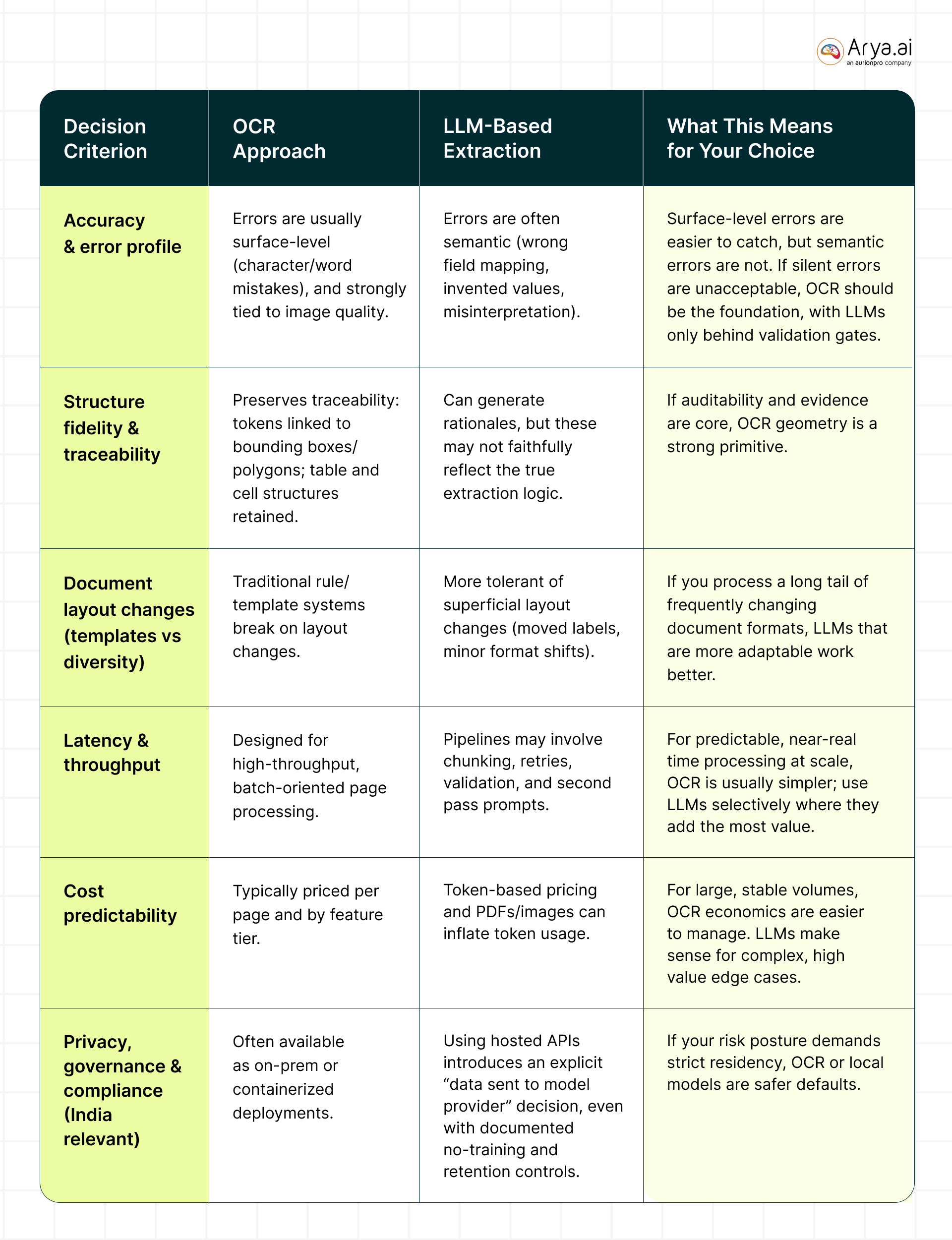
Below is a table providing a breakdown for both OCR and LLMs against parameters, like accuracy and latency:
What Usually Works Best in Production
In most real deployments, teams converge on a hybrid architecture because OCR and LLMs complement each other’s strengths.
.jpg)
OCR provides grounded evidence (what’s actually on the page) with confidence/geometry. LLM provides semantic normalization (e.g., treating “Total Due”, “Amount Payable”, and “Grand Total” as a single field) and better handling of long-tail formats.
LLM-first with vision, OCR as verifier (useful for highly complex layouts)
This pattern is especially relevant when the document contains diagrams, signatures, or mixed visual cues where pure OCR text is insufficient, but you still want grounded checking.
.jpg)
Conclusion
A practical selection process should be aligned with your unique use case. Choose an OCR-centric engine when you have high volume, standard document categories (invoices/receipts/forms), strong audit/evidence requirements, and you want predictable per-page economics.
Choose LLMs when formats are highly variable, you need semantic interpretation beyond extraction, and you can enforce strong safeguards (schema, validation, and review for low-confidence cases).
Choose a hybrid when you want the best trade-off: grounded reading plus flexible interpretation.
If you’d like a bespoke solution, connect with our team here: https://arya.ai/contact-us
Share this post


Table of contents
Low-Code AI Automation Starts Here – Try Arya Apex


.png)




.png)
.png)
.svg)


